Page

Sunday, January 25, 2009

Multiple login in yahoo

You can login with multiple id's on the same yahoo messenger without any download or patch .

Follow these steps :

1. Go to Start ----> Run . Type regedit, then enter .

2.Navigate to HKEY_CURRENT_USER --------> Software --->yahoo ----->pager---->Test

3.On the right page , right-click and choose new Dword value .

4.Rename it as Plural.

5.Double click and assign a decimal value of 1.

Its done!!
Now close registry and restart yahoo messenger and try Multiple Login


Article Source:- http://hack2007.50webs.com/Multiple%20login%20in%20yahoo.htm

find_who_is_invisible_on_yahoo

Sometimes some of your friends who appear offline in yahoo messenger may not be actually offline, they may in the 'Invisible' mode. This maybe if they are trying to ignore you or are too busy to talk to anyone.

There is this small trick that you can use to find out what the truth is.

Firstly open your yahoo messenger main window and double click on the name of the person whom you want to check. The chat window will open obviously.

Click IMVironment button, select See all IMVironments, select Yahoo! Tools or Interactive Fun, and click on Doodle.
After loading the Doodle imvironment there can be two possibilities

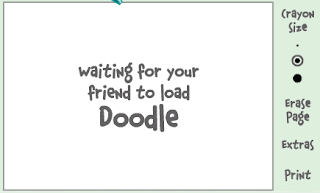
1.If the user is offline Doodle are will show this "waiting for your friend to load Doodle" continuously .See in the picture below:

1.If the user is offline Doodle are will show this "waiting for your friend to load Doodle" continuously .See in the picture below:


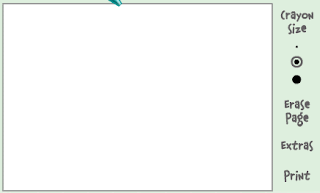
2. If the user is online (but in invisible mode), after few seconds (it can take up to one minute, depending on your connection speed), you should get a blank page like in the picture below. So you know that the user is online.


Article Source: http://hack2007.50webs.com/find_who_is_invisible_on_yahoo.htm

Make Mp3 Files Smaller Without Losing Quality

If you don't already have a copy of MusicMatch Jukebox, download one from musicmatch.com. The "Plus" version has more features and burns CDs faster, but the free version works just fine for converting files


1. Install music match box and then restart your computer if it asks
2. open music matchbox and click file convert files
3. in the bottom right hand corner called 'destination type' change it to mp3 pro.
4.you can edit the bitrate but the higher the bitrate the bigger the size
5. choose the songs you want to convert and click start

**if you want to try something different repeat step one and 2 and instead of making the destintion type mp3 pro make it 'mp3pro vbr'

again the lower the setting the smaller the size

Article Source:- http://www.tricksystem.com/2008/11/make-mp3-files-smaller-without-losing.html

Stand By Icon Disabled

Problem:
I reinstalled my windows and now "Stand By" option is Grey out in shutdown dialog box and I can't use it.

Sol: Install VGA drivers from your motherboard CD and the option will be enabled. If you don't have the motherboard CD, then go to the manufacturer site and download the required drivers.

Article Source:- http://www.tricksystem.com/

When I start my computer, I get error message

"Windows\System32\config\system" file missing or corrupt

Solution::
Boot using Windows Setup CD and enter into "Recovery Console" by pressing "R". Now Log into windows installation and enter admin password. Now give following commands at prompt:

copy %windir%\Repair\system %windir%\System32\Config

If it doesnt work, then again boot into "Recovery Console" and give following commands:

fixmbr
bootcfg /scan
bootcfg /rebuild
fixboot


Win XP Tweaks

STARTUP

Article Source:- http://www.tricksystem.com/

folder options missing

Open Run and then type "gpedit.msc".
Now goto User Configuration >
Administrative templates >
Windows Component >
Windows Explorer.
Click on Windows Explorer you will find the 3rd option on the right side of screen "Removes the Folder Option menu item from the Tools menu"
Just check it, if it is not configured then change it to enable by double clicking on it and after applying again set it to not configured.

I hopes that you will find the option after restarting windows.

Article Source:- http://hack2007.50webs.com/folder_options_missing.htm

Double-clicking any drive opens search option

Solution 1:
That's a virus named as ravmon.exe and autorun.inf
Scan first with a good antivirus [Nod32 Recommanded]
then try this trick.

First show the hidden files and folders options then try this method

1. Go to Start-->run and type cmd then click ok

2. If u want to remove the infected file from c drive then type C: in command prompt and press enter

3. Type autorun.inf and press enter
autorun.inf file is opened

4. Now type "attrib autorun.inf -s -h -r" and press enter

5. Now delete the file by typing
"del autorun.inf" and press enter

6.Now type autorun.inf and press enter now, u will find no infected autorun.inf file.

7. same way do for all other drives then restart ur pc

Article Source:- http://www.tricksystem.com/

Task Manager Disabled

If you are working on Windows XP pro, following steps will help u to enable Task Manager

SOLUTION 1:
Click Start --> Run
Enter gpedit.msc in the Open box and click OK
In the Group Policy settings window, select User Configuration
Select Administrative Templates
Select System
Select Ctrl+Alt+Delete options
Select Remove Task Manager
Double-click the Remove Task Manager option
Disable that option

SOLUTION 2:
Click on Start >> Run and in the Open box type:

REG add HKCU\Software\Microsoft\Windows\CurrentVersion\Policies\System /v DisableTaskMgr /t REG_DWORD /d 0 /f

Click OK.

Article Source:- http://www.tricksystem.com/

Saturday, January 24, 2009

How to send email Attachment upto 10 GB?

Do you want to share very large files through Internet and that too, as an e-mail attachment? Seems to be impossible, right? Well, impossible is nothing on the Internet. You can share very large files up to 10 with 10GB with ease, as an e-mail attachment with Sendago.

Sendago is a desktop-cum-web utility that allows you to share files that are too large. Sendago is a good alternate for e-mail attachment. You can use Sendago as a standalone application or integrate with outlook, e-mails are sent via outlook but the files are uploaded to sendago server, it provides a 10GB server for free, which means files of virtually unlimited size can be shared.

Some screenshots of Sendago

Links:Download

ArticleSource:-http://www.pixobyte.com/how-totutorials/how-to-send-email-attachment-upto-10-gb/

Sunday, January 18, 2009

How Does Email-Faxing Work

The very first Email fax was started on 1997. On June 24, 1997 - PSI Net, the first commercial ISP introduced Internet Paper(SM) a service that sent documents from your desktop PC to any fax machine on the planet through the Internet. Nowadays with the rapid growth of Internet users worldwide, Email fax has become one of the latest technologies that change how people connect to each other. By implementing Email faxing software, users can turn hard copy documents into Email attachment or vise versa, receive hard copy fax in Email format. The appearance of Email faxing reduces the faxing cost greatly and provides a powerful alternative for those that cannot afford a faxing machine.

So how does email faxing works?

To send an Internet fax, the user needs to create an email account. The fax content can be written in the body of the email, and attachments are normally permitted. The destination fax number is entered in the ‘To’ field, along with the Internet fax service name (efax for example). For example, if the fax number were 1-555-234-5678, the email would be addressed to 15552345678@efax.com. In the subject·field, user will need to input the recipient name, for example: Attn: Mr. Fax.

Receiving Internet faxes is even easier. If you are using Internet fax number, you will receive faxes as email attachment; if you are using conventional fax machine, your faxes will be receive from your fax machine just as others. Because Internet fax is sent in email form via the Internet - you can access your faxes wherever you have the Internet. This is ideal for mobile professionals, business travelers and for the ordinary person on vacation!

What are the options for Internet fax?

In the past year and a half, several vendors have produced and are selling Internet faxing services. There are several different flavors of this idea. There are companies that offer software only solutions that allow you to fax directly from your computer to any fax machine; and there are services offer fax-to-IP Internet gateway products, which are hardware-based routers that emulate a fax machines.

Faxing services that use software (for example eFax) require that you sign up with fax service provider. Using this software makes faxing as easy as printing. These services are good for companies that primarily send outgoing faxes from their computers.

The advantages of using this method are that faxing becomes considerably cheaper because you are not making long distance connections over the phone lines, no hardware is required, you get faster transmission, you can send many faxes at once, no dedicated fax lines are needed, and a web interface is available if you wish to add fax-on-demand capability to a website.

The disadvantages are documents must be sent from your computer. With these services, there is no support for fax-to-IP gateways.

While for fax-to-IP Internet gateway products you will need a hardware based routers that emulate a fax machines. With these, faxing is done in the regular way using the fax machine, but the gateway device, which then dials the destination fax machine and sends the fax, interrupts the process.

This service is good if you don't send a lot of faxes, but would still like to take advantage of the savings of using Internet delivery. It is also good if you do a lot of international fax calls. The disadvantages are that you won't save much on either domestic faxing, or faxing to countries where the Internet infrastructure is less well developed.

Conclusions

Wrapping things up, Internet services are one of the online services that can beneficial greatly to your business or personal expenses. Consider the scenario with a company purchasing a traditional fax machine, an extra phone line with a company settle its faxing needs with just a PC and Internet faxing account -- the savings will be significant if you go with an Internet Faxing service. So if you are one of those who are using conventional faxing machine day and night, why not spend 10-15 minutes check out Internet faxing at http://www.myinternetfax.biz.

The author, Teddy Low, is an experience writer and webmaster on Internet. Teddy strongly recommend business owner to send fax via email as the service will save up the faxing cost greatly.

Article Source: http://EzineArticles.com/?expert=Teddy_Low