Page

Friday, June 5, 2009

ASUS Unleashes Secure Laptops & Tablet

ASUSTeK Computer (ASUS) has today officially launched the R1 tablet PC, V1 and F2 laptop series which offer a smart balance of mobility and performance with comprehensive security features that protect with both software as well as hardware solutions, providing a secure and convenient computing experience for business professionals on the go.
ASUS protected computing starts with fingerprint authentication that grants strict access only to the designated owner. With one swipe, the electronic imaging mechanism reads the fingerprint pattern from the live layer of skin, bypassing any common skin surface conditions that can impair the accuracy of the reading.

With ASUS Security Protect Manager, you can choose to setup multi-factor authentication requirements for data access of different security level. Both passwords and fingerprints can be used as the method of verification. Passwords are encrypted and stored in the hardware-based Trusted Platform Module (TPM) ensuring end-to-end security and avoid attacks by hackers looking to capture passwords and encryption keys for sensitive data.

The R1F (317x232x35mm, 1.98kg) offers a wide aspect visual enjoyment while remaining compact for high mobility. The 180-degrees convertible LCD screen allows easy presentation and data sharing during meetings or at gatherings. Increase productivity and efficiency with handwritten input capability. Together with InfoPen software, users can record and edit images or documents as easy as on a piece of paper with colour and highlighter options. The DigiPen stylus also has an eraser end and mouse control buttons so that users can now navigate a wide range of applications with single-handed ease.

Key features of the tablet PC include Intel Centrino Duo Mobile Technology, Intel Core Duo Processor T2050/T2250/T2300E/T2400/T2500, Intel Core 2 Duo Processor T5500/T5600/T7200/T7400, Mobile Intel 945GM Express Chipset, Intel PRO/Wireless 3945ABG Network Connection, Microsoft Windows XP Tablet PC Edition, up to 2GB of DDR2 667MHz memory, 13.3-inch WXGA Color Shine & Crystal Shine LCD, SATA 80/100/120GB HDD (second HDD available), hot swappable optical drive, 10/100/1000 Ethernet, 802.11a/b/g, Bluetooth V2.0 + EDR, three USB ports, Express Card, 8-in-1 Card-Reader, Fingerprint Reader, and TPM (optional).

The V1 (363x263x357mm, 2.7kg) series is an ultra-slim 15.4-inch model. The detachable docking station is an ideal solution for quick connection of peripherals, power and communication devices. Whether at home or in the office, it offers advanced practicality and time saved when leaving and returning to the desk.

Key features include Intel Centrino Duo Mobile Technology, Intel Core 2 Duo Processors T7600/T7400/ T7200/T5600/T5500, Mobile Intel 945PM Express Chipset, Intel PRO/Wireless 3945ABG Network Connection, Microsoft Windows XP, up to 2GB of DDR2 667MHz memory, 15.4-inch ZBD LCD, ATI Mobility Radeon X1600 256/512MB, SATA 80/100/120GB HDD (second HDD available), 10/100/1000 Ethernet, 802.11a/b/g, Bluetooth V2.0+EDR, three USB 2.0 ports, Card Reader, S/PDIF, Express Card, and Fingerprint Reader.

The F2 (343x280x40mm, 2.7kg) series offers wire-free communication ‘anywhere’. With exclusive ASUS MiVo module, users of Skype can place a mobile-to-mobile, mobile-to-PC or PC-to-mobile call anywhere in the world for the price of a local call. A broadband connection such as cable or DSL and access to a regular phone line are the only connections required to make a MiVo call. Once connected, MiVo monitors the Skype session and automatically forwards any incoming as well as outgoing Skype calls to any designated phone/PC, giving users the ultimate wireless freedom even away from the notebook!
The laptop includes Intel Centrino Duo Mobile Technology, Intel Core Solo Processor T1350, Intel Core Duo Processor T2050/T2250/T2300E/T2400/T2500, Intel Core 2 Duo Processor T5500/T5600/T7200/T7400, or Intel Celeron M 420/430, Mobile Intel 945GM/940GML Express Chipset (F2F/HF) or Mobile Intel 945PM Express Chipset (F2J/JE), Intel® PRO/Wireless 3945ABG Network Connection, Microsoft’s Windows XP, up to 2GB of DDR2 667MHz memory, 15-inch XGA LCD, ATI Mobility Radeon X1400/1450 DDRII 128MB, SATA 80/100/120/160GGB HDD, 1.3-Megapixel Webcamera (optional), 10/100/1000, 802.11a/b/g, Bluetooth V2.0+EDR (optional feature), three USB, TV-Out, Express Card, 7-in-1 Card Reader, Fingerprint reader, and TPM (optional).

Source:- http://www.finalsense.com/news/it/notebook_pocketpc/asuse_unleashes_laptops.htm

Samsung Q40 Pink Laptop

Looks like the color pink is here to stay in the digital world. While all you macho men out there may not touch a pink laptop from miles, us girls don’t mind some pink! The UK store PC World has released an exclusive Samsung Q40 Pink Laptop, which will surely get noticed in the dull black and white world of notebooks. Weighing just 1.15kg and about 1 inch thick, the Q40 may just be a girl’s new best friend!

Not just a pretty package, the Q40 is powered by an Intel 1.2GHz Core Solo processor and has specs like 512MB RAM, 60GB hard disk drive, 12.1-inch widescreen SuperClear display, and an external DVD re-writer. There is Wi-Fi connectivity and it uses Microsoft’s Windows XP professional as its operating system. It is available now and you can but it from the PC World website or select PC World stores.

Computing doesn’t have to be grey or dull, says PC World. The UK superstore has pumped some colour into the world of technology with the exclusive Samsung Q40 Pink Laptop.

The striking (and I’m not sure in a good way - Ed!) laptop brings together unique looks and the latest technology in an ultra-portable small, lightweight size.

The Samsung Q40 Pink Laptop weighs only 1.15kg and is under an inch thick. It’s so slim and light that it’s an ideal choice for mobile working. The Q40 is easy to slip into a stylish bag to carry and use everywhere; on the train or plane, in the hotel or at home.

The Samsung Q40 Laptop isn’t just pretty to look at, the glossy pink top hides a well specified, powerful laptop from one of the best names in the industry. Features include a Intel 1.2GHz Core Solo processor, 512MB RAM, 60GB hard disk drive, 12.1-inch widescreen SuperClear display, and an external DVD re-writer. The laptop is wireless enabled and comes complete with Microsoft’s Windows XP professional and a range of security software.

Colour conscious consumers can find a range of other colourful and useful accessories at PC World proving that computing certainly doesn’t have to be grey or dull. For instance, a Swordfish 14-inch pink laptop sleeve provides an added layer to protection for your laptops and is priced at £14.99. Made from neoprene memory foam the sleeves are available in a range of sizes and other bright colours including Red, Green, Turquoise, Purple and Black.

Source:- http://www.finalsense.com/news/it/notebook_pocketpc/samsung_q40_pink_laptop.htm

Lenovo ThinkPad Z61t Review

This is a review for the new 14.1 widescreen ThinkPad Z61t with titanium cover. The Z61t is the update to the newer widescreen Z series of ThinkPads. It sports Intel's Core Duo processor. The Z series is the more multimedia oriented notebook in the ThinkPad line with a widescreen display, built-in web cam, media card reader, FireWire connector and more. It combines the convenience and mobility of a notebook with the performance and functionality of a desktop.

Reason for Buying
I used to have a Dell Inspiron 1100, bought 3 years ago just because I thought it was a good deal. It used a 2 GHz Celeron processor. I soon realized what a mistake it was. I used to curse it every other day. It was nothing but a brick and after 1 year of it would mysteriously shutdown after using it for more than 2 hours. It was producing enough heat to keep my house warm in winter. I ditched it after just 1 years of use. I was somehow managing with my office supplied Pentium III 900 MHz desktop.

Then along came my daughter, who is 4 months old now. My wife started complaining that I was spending too much time at the home-office with my desktop, not spending enough time with my daughter. She couldn't find time to use the desktop as well, as the baby needed constant attention. So I decided I needed to get a laptop so that I could watch TV, watch my daughter and browse all at the same time. I also wanted something light so that I can easily carry it around the house with one hand. Another requirement was to have all the data to be in one secure place. I have an external USB hard disk /printer/ DVD burner, LCD monitor etc. Also I make it a point to backup my computer frequently with the external hard disk. I couldn't afford to connect all these accessories and disconnect them one by one when I needed to carry the laptop. So, a mature and easy docking solution was a must.

How and Where Purchased
My initial budget was around $1000. I started with Sony but didn't really like their pricing and lack of core duo in a 14-inch laptop. My friend had a Fujitsu notebook and I was impressed with its quality. But I couldn't configure a Fujitsu notebook for less than $2000 with a core duo processor. I spent some time looking at an HP dv2000t, but their docking solution is a joke. Plus, the build quality wasn't enough for me. Next was the Dell latitude D620. The build quality looked good. I'm not sure why I looked at Dell again given my first experience, but either way I decided against the D620 at the last moment because of lack of S-video and previous Dell nightmares. I then found NotebookReview.com and took my friend's suggestion to take a look at ThinkPads. I didn't know Lenovo had widescreen consumer oriented notebooks. After researching for 2-days I was hooked. I needed a ThinkPad at any cost. I raised my budget to $1,400 but still couldn't configure one with Bluetooth and a DVD writer for under $1,600 with tax. Then I figured out that IBM has EPP pricing which really makes sense. Dell has 12% EPP, but after researching I found Dell EPP was more expensive than non-EPP if you use certain Dell coupons. HP just gives you 10% for EPP. After raising my budget to $1,800, I found an IBM consultant at work and got access to EPP pricing. I had to ship the notebook to Delaware to save $110 tax.

The total cost was, $1,599 ( laptop ) + $265 ( Advanced Dock) + $92 ( 3 year warranty) - $200 ( Discount) = $1,756. The web price will be around $2,600 with tax. I will talk about the additional $200 discount in the support section!

ThinkPad Z61t specs as reviewed:
2.0 GHz Intel T2500 Core Duo
14.1" WXGA+, 1440X900 LCD display
100GB hard drive (5400rpms)
CD-RW/ 8X DVD-RW Multi-burner
1GB SDRAM (1 DIMM)
Bluetooth
Modem
Built-in Camera and microphone
Sudden motion sensor
Fingerprint Reader
802.11 a/b/g wireless built-in
Verizon EVDO built-in
3-in-one card reader
3-year international depot warranty
4.3 lbs Plus
Z61 advanced Dock
Model# 94402CU
Build & Design

The Z61t is built solidly but not rock solid like T series. It was a little thicker than I imagined. The titanium cover is a plus and looks decent unlike those shiny HP laptops. As soon as you open the screen, you will notice that this laptop feels solid. The inside is made from rugged and elegant high quality plastic.

Two metal hinges of same size support the display. There is no wobbling when opening and closing the lid. You will need both the hands to open the screen. Also, if you try to open it with just one hand, you don't see the screen bend like other laptops. The look and feel of the area around the screen might even make you think it's made of metal not plastic. The only thing that looks plastic is the shiny EVDO antenna cover which is attached to the screen.

To get an idea of the relative thickness of the Z61t, I placed 2 miniDV tapes next to the laptop. The laptop is around 1 inch thick.

Source:- http://www.finalsense.com/news/it/lenovo_thinkpad_z61t.htm

Samsung Sens G10

And here you are the latest big fat baby from Samsung the Sens G10.

Samsung Electronics today launched its new behemoth of a model in Sens G10 notebook. Samsung claim its a replacement of the desktop. Lets check out if it really is a replacement for your desktop. Well, the notebook is powered by a an AMD Semptron processor and comes with a whopping 200GB SATA (serial Advanced Technology Attachment) HDD running at 7200rpm.

The notebook features a 17 inch LCD screen with a 700:1 contrast ratio and 300(cd/m2) brightness. The response time of 6ms ensures your precious eyes remain perfectly in tact without much strain. The graphics is powered by a GeForce Go 6100 Video card. Also the most striking thing is that it makes use of an AC adapter instead of battery unlike most other notebooks in the market. But the disappointing thing is that for a laptop claiming as a desktop replacement, it does not get a Duo-core processor. No word on the pricing and availability as yet, but the notebook seems to be a Korea only product for now.

Source:- http://www.finalsense.com/news/it/notebook_pocketpc/samsung_sens_g10.htm

Sony VAIO VGN-TXN10

Sony and Sprint have teamed up to offer Sony TX-series users integrated broadband connectivity courtesy of Sprint's Power Vision Network. Until now, Sony has only offered Wan connectivity via Cingular's EDGE network. The Sprint Power Vision, is based on the faster EV-DO Revision A technology and will give professionals broadband-like wireless connectivity.

The VAIO VGN-TXN10 series laptops are ultraportables that weigh just 2.8 pounds and are less than an inch thick. All are Windows Vista Capable/Premium Ready and run on a low-voltage Intel Core Solo processor. Battery life is estimated at five to eleven hours. These laptops also include a dual-layer DVD burner, an 11.1-ich widescreen display, Sony's SmartWi technology for seamlessly integrating Wi-Fi and Bluetooth, and Sony's Instant Mode for indulging in your favorite movies or music without booting Windows. For the security-minded, a fingerprint reader is included, as well as G-Sensor shock hard drive protection for safeguarding the notebook against drop damage.

Later this year, Sprint plans to upgrade its network in select markets with EV-DO Revision A technology, which will give subscribers 450-800 kbps download speeds and 300-400 kbps upload speeds. Sprint's wireless broadband network currently covers more than 157 million people in 216 metropolitan areas and 486 airports nationwide. EV-DO Revision A will reach more than 40 million people in select markets by the end of the year.

Source:- http://www.finalsense.com/news/it/notebook_pocketpc/sony_vaio_vgn_txn10.htm

Toshiba Satellite M115-S3104

Another addition to the M115 line of notebooks from Toshiba is the S3104 notebook. Available in an elegant Mist gray colour, the notebook has got more to offer than just eye catching design and looks.

Targeted mainly at consumers who are looking for a laptop with basic computing functions and with some additional multimedia flexibility.
Starting at 5.2 lbs, it gets Core Duo processor (T2050 1.6Ghz), Windows XP Media Center Edition 2005 and 80GB 5400rpm HDD. It gets an upgrade in the memory department from the previous model, 1GB RAM.

It includes Graphics Media Accelerator 950 with 8MB-224MB dynamically allocated shared graphics memory. Other additional features include 5-in-1 Bridge Media Adapter, 4-USB (2.0) and Intel PRO/Wireless 3945ABG LAN. Take a glance at the extended entry for complete list of specifications.


Specifications :

Processor Type : Core™ Duo
Processor Number : T2050
Processor Speed : 1.60GHz
Operating System : Genuine Windows® XP Media Center Edition 2005
Memory Size : 1024MB
Display Size : 14.1"
Display Type : Widescreen XGA with TruBrite™ Technology
Display Resolution : 1280x800
Graphics Chipset : Graphics Media Accelerator 950
Graphics Memory : 8MB-224MB dynamically allocated shared graphics memory
Hard Drive Size : 80GB
Battery Type : Li-Ion (6-cell, 4000mAh)
Battery Life : Up to 3.97 hours
PC Card Slots : 1-Type II PC Card Slot
PC Express Slot: No PC Express Slot
Media Port : 5-in-1 Bridge Media Adapter
USB Slots : 4-USB (2.0)
iLINK : i.LINK™ IEEE-1394
S-Video : TV-out (S Video)

Source:- http://www.finalsense.com/news/it/notebook_pocketpc/toshiba_satellite_review.htm

Children's Machine (CM1) Production Specs

Now that One Laptop Per Child have given its computer a name, CM1, The Children's Machine, it's also reveling more about the notebook's specs.

Unlike any laptop ever built
CM1 is not a cost-reduced version of today's laptop; we have fundamentally reconsidered personal computer architecture—hardware, software, and display. Unlike any laptop ever built, CM1:

● Creates its own mesh network out of the box. Each machine is a full-time wireless router. Children—as well as their teachers and families—in the remotest regions of the globe will be connected both to one another and to the Internet.

● Features a 7.5-inch, 1200×900-pixel, TFT screen and self-refreshing display with higher resolution (200 DPI) than 95% of the laptops on the market today. Two display modes are available: a transmissive, full-color mode; and a reflective, high-resolution mode that is sunlight readable. Both of these modes consume very little power: the transmissive mode consumes one watt—about one seventh of the average LCD power consumption in a laptop; and the reflective mode consumes a miserly 0.2 watts.

● Can selectively suspend operation of its CPU, which makes possible further remarkable power savings. The laptop nominally consumes less than two watts—less than one tenth of what a standard laptop consumes—so little that CM1 can be recharged by human power. This is a critical advance for the half-billion children who have no access to electricity.

Free software
To enhance performance and reliability while containing costs, CM1 is not burdened by the bloat of excess code, the “feature-itis” that is responsible for much of the clumsiness, unreliability, and expense of many modern laptops. We intend for CM1 to start up in an instant—faster than any commercial laptop now available—and move briskly through its operations.

CM1 is an open-source machine: free software gives children the opportunity to fully own the machine in every sense. While we don't expect every child to become a programmer, we don't want any ceiling imposed on those children who choose to modify their machines. We are using open document formats for much the same reason: transparency is empowering. The children—and their teachers—will have the freedom to reshape, reinvent, and reapply their software, hardware, and content.
The generation-one machine’s core electronics begin with the 400Mhz AMD Geode processor. There are 128MB of dynamic RAM and 512MB of SLC NAND flash memory on board. The basic integrated operating system is a “skinny” Fedora distribution of Linux. The user interface is specially designed to support collaborative learning and teaching: every activity comes with a support network of teachers and children, so learning need not be an isolated, lonely endeavor.

Children's Machine - CM1Features
Each machine features a video/still camera, three external USB-2.0 ports, plus an SD slot.

CM1 is VOIP-enabled, creating another link among users (both locally and globally). It features Csound, an incredibly powerful and versatile music synthesis software that takes advantage of a full-featured audio codec (and the mesh network for collaborative musical performances). There are internal stereo speakers, as well as a stereo line-out jack. The microphone is built in, with a mic-in jack, which offers another unique feature: “sensor input” mode. The children can plug in any of a number of home-made data sensor, enabling them, for example, to turn their machines into thermometers or oscilloscopes.

Form factor
Form factor was a priority from the start: the laptop could not be big, heavy, fragile, trivial, ugly, dangerous, or dull. Another imperative was visual distinction. In part, the goal is to strongly appeal to CM1’s intended users; but the machine’s distinctive appearance is also meant to discourage gray-market traffic. There’s no mistaking what it is and who it is for.

CM1 is about the size of a textbook and lighter than a lunchbox. Thanks to its flexible design and “transformer” hinge, the laptop easily assumes any of several configurations: standard laptop use, ebook reading, and gaming.

The laptop has soft, rounded edges. The integrated handle is kid-sized, as is the sealed, rubber-membrane keyboard. The novel, dual-mode, extra-wide touchpad supports pointing as well as drawing and writing.

Safety and reliability
CM1 is fully compliant with the European Union’s RoHS Directive. It contains no hazardous materials. Its NiMH batteries contain no toxic heavy metals, plus it features enhanced battery management for an extended recharge-cycle lifetime. It will also tolerate alternate power-charging sources, such as car batteries.

To top off the battery—for use at home and where power is not available—CM1 can be hand powered. It will come with at least two of three options: a crank, a pedal, or a pull-cord. It is also possible that children could have a second battery for gang-charging at school while they are using their laptop in class.

Experience shows that the laptop components most likely to fail are its hard drive and internal connectors. CM1 has no hard drive to crash and only two internal cables. For added robustness, the machine’s plastic walls are 2.0mm thick, as opposed to the standard 1.3mm. Its mesh network antennas, which far out-perform those of the typical laptop, double as external covers for the USB ports, which are protected internally as well. The display is also cushioned by internal “bumpers.”
The estimated product lifetime is at least five years. To help ensure such durability, the machines will be subject to factory testing to destruction as well as in situ field testing by children.

A real computer
Some computer industry figures have publicly dismissed the CM1 as a stripped-down toy—a gadget. “Geez”, asked one, “why not get a real computer?” Indeed. These individuals certainly now know better: as a not-for-profit, we have done something out of their reach—something for the children of the world. Comments and critiques are, of course, always welcome at laptop.org.

"a unique harmony of form and function; a flexible, ultra low-cost, power-efficient, responsive, and durable machine with which nations of the emerging world can leapfrog decades of development" What might those surprises be? Comparing the CM1 page to the original hardware specs we find that the OLPC computer will have:

● a 400Mhz AMD Geode processor instead of a 366 Mhz one
● an integrated digital video camera and still camera (resolution for either is unknown still)
● an SD slot, which is a curious diversion from the usual all-Open Source mantra
● VoIP-enabled with microphone and speaker jacks. No word on the VIOP software.
● CM1's plastic walls are 2.0mm thick, .7 mm more than the standard 1.3mm.

For those worried that the OLPC will become a environmental mess at the end of its life expectancy, a fanciful 5 years according to OLPC:

"The CM1 is fully compliant with the European Union’s RoHS Directive. It contains no hazardous materials. Its NiMH batteries contain no toxic heavy metals."

SOURCE:-

http://www.finalsense.com/news/it/notebook_pocketpc/childrens_machine_cm1.htm

Pocket Tanks 1.2

Editor's Review - Pocket Tanks

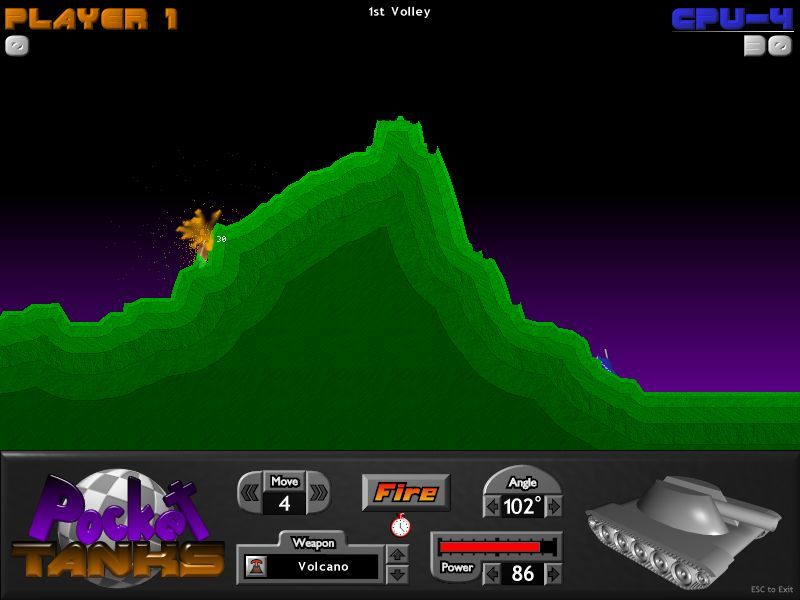
Fight your opponent, the computer, or simply target practice on your own experiencing all the weapons in the arsenal. You can move select an angle and power, and fire over 30 new distinct weapons at your opponent. The 60 weapon arsenal includes funny weapons such as: boomerang, mega cruiser, super skipper, fission bomb,etc.

10 shots for each player. Matches are won based on points for good aiming. You can set the terrain type, the explosion size, wind direction in order to make thing a bit complicated. Simply designed Arcade style game.

Pluses: Nine weapon expansion packs out of which five are free to download.
Drawbacks / flaws:
In conclusion: Simple, extremely funny and easy to play for all ages. Start shelling your opponent now!

version reviewed: 1.2

Pocket Tanks Publisher's Description

This is the fastest game of artillery you will ever play. Pocket Tanks is streamlined to be easy to learn and fun for all ages. Select your angle, power, and fire over 30 distinct weapons at your opponent. Games are won based on points for good aiming and is lighthearted fun. There is an innovative Weapon Shop to keep the game moving fast and a Target Practice mode for experimenting with all the weapons no holds barred.

System Requirements
233 Mhz CPU, DirectX 3 or higher, video card that supports 16/24/32 bit color


Download Free download

Mirror Link –1 (ptanks.exe)     Mirror Link - 2 

- JMD Computer

* if Link is Broken, fill free form click here with Link Details.

Source:- http://www.soft32.com/download_6692.html

Thursday, June 4, 2009

RealM vs RealM - Warhammer Online - Age of Reckoning

Download Coming Sooooooooon

Source:- http://www.warhammeronline.com/trial/

Wednesday, June 3, 2009

Warhammer Online: Age of Reckoning News

  • PTS Phase 2 is Underway - The second phase of testing for game update 1.3 started on Thursday. During this phase of testing more combat and career changes and adjustments will be implemented in response to player feedback from the first round of testing. Also in this phase the Realm Resource Quest will be introduced, this is the quest which will be use to control who has access to the new Land of the Dead. All in all it sounds like it will be a lot of fun so make sure you get over there and check it out and don't forget to leave feedback!


  • PTS Testing Event - Tonight the devs will be hosting another Public testing event for game update 1.3. The main focus will be to test out the Realm Resource Quest and to gather player feedback on the new addition. The event will begin at 8:30 pm EDT and will continue on through the evening. So, be sure to copy over your characters by visiting the Mythic Account Center. Anyone who participates and leaves feedback will automatically be entered to win an Imperial Gryphon Mount (Order) or an Enslaved Manticore Mount (Destruction).

Online  Game Video Coming Soon

  • Land of the Dead Grab Bag - Everyone is anticipating the release of the new Land of the Dead Zone. I read a very interesting Q&A on the WAR site about the new content and I have to say I learned a few things I did not know before! It contains answers to questions pertaining to everything from instance mechanics to loot. It is a definite must read for every WAR fan!


  • Product Spotlight - Everyone knows that FTW MMO strategy guides has one of the best, most comprehensive WAR Leveling and Strategy Guides available on the market today! This guide has just received some major updates to keep it in line with the changes to the game. The guides now include all new quests, new flight paths, detailed numbered maps, RvR quests and detailed public Quest information! The WAR Combo Pack from FTW is a definite must have for every Warhammer fan! Get your copy today for just $44.99, or buy one side for just $29.99.

Download Coming Soon

download