Page

Sunday, January 25, 2009

Multiple login in yahoo

You can login with multiple id's on the same yahoo messenger without any download or patch .

Follow these steps :

1. Go to Start ----> Run . Type regedit, then enter .

2.Navigate to HKEY_CURRENT_USER --------> Software --->yahoo ----->pager---->Test

3.On the right page , right-click and choose new Dword value .

4.Rename it as Plural.

5.Double click and assign a decimal value of 1.

Its done!!
Now close registry and restart yahoo messenger and try Multiple Login


Article Source:- http://hack2007.50webs.com/Multiple%20login%20in%20yahoo.htm

find_who_is_invisible_on_yahoo

Sometimes some of your friends who appear offline in yahoo messenger may not be actually offline, they may in the 'Invisible' mode. This maybe if they are trying to ignore you or are too busy to talk to anyone.

There is this small trick that you can use to find out what the truth is.

Firstly open your yahoo messenger main window and double click on the name of the person whom you want to check. The chat window will open obviously.

Click IMVironment button, select See all IMVironments, select Yahoo! Tools or Interactive Fun, and click on Doodle.
After loading the Doodle imvironment there can be two possibilities

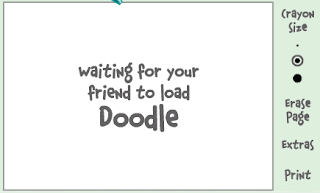
1.If the user is offline Doodle are will show this "waiting for your friend to load Doodle" continuously .See in the picture below:

1.If the user is offline Doodle are will show this "waiting for your friend to load Doodle" continuously .See in the picture below:


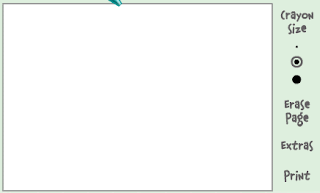
2. If the user is online (but in invisible mode), after few seconds (it can take up to one minute, depending on your connection speed), you should get a blank page like in the picture below. So you know that the user is online.


Article Source: http://hack2007.50webs.com/find_who_is_invisible_on_yahoo.htm

Make Mp3 Files Smaller Without Losing Quality

If you don't already have a copy of MusicMatch Jukebox, download one from musicmatch.com. The "Plus" version has more features and burns CDs faster, but the free version works just fine for converting files


1. Install music match box and then restart your computer if it asks
2. open music matchbox and click file convert files
3. in the bottom right hand corner called 'destination type' change it to mp3 pro.
4.you can edit the bitrate but the higher the bitrate the bigger the size
5. choose the songs you want to convert and click start

**if you want to try something different repeat step one and 2 and instead of making the destintion type mp3 pro make it 'mp3pro vbr'

again the lower the setting the smaller the size

Article Source:- http://www.tricksystem.com/2008/11/make-mp3-files-smaller-without-losing.html

Stand By Icon Disabled

Problem:
I reinstalled my windows and now "Stand By" option is Grey out in shutdown dialog box and I can't use it.

Sol: Install VGA drivers from your motherboard CD and the option will be enabled. If you don't have the motherboard CD, then go to the manufacturer site and download the required drivers.

Article Source:- http://www.tricksystem.com/

When I start my computer, I get error message

"Windows\System32\config\system" file missing or corrupt

Solution::
Boot using Windows Setup CD and enter into "Recovery Console" by pressing "R". Now Log into windows installation and enter admin password. Now give following commands at prompt:

copy %windir%\Repair\system %windir%\System32\Config

If it doesnt work, then again boot into "Recovery Console" and give following commands:

fixmbr
bootcfg /scan
bootcfg /rebuild
fixboot


Win XP Tweaks

STARTUP

Article Source:- http://www.tricksystem.com/